Multiple products
Keep multiple products or independent documentation sections in one site.
On this page
Mark a documentation space
A space is a folder with its own sidebar and adjacent-page sequence. Use it for a product, SDK, or independent documentation section.
title: Documentation for your project
description: Everything you need to get started.
links:
  - label: Get started
    to: /getting-started/introduction
export default defineAppConfig({
  indocio: {
    docs: {
      content: { width: '42rem' },
      sidebar: { enabled: true, width: 240, collapsible: false },
      toc: { enabled: true, position: 'content', depth: 3 },
      breadcrumbs: true,
      footer: true,
      navigation: true,
      search: true,
      actions: { copyLink: true },
    },
    spaces: { switcher: 'dropdown' },
  },
})
space: true enables independent navigation. redirect selects the switcher's destination, relative to the space folder. Omit it to use the first page in content order. An absolute destination must stay inside the space. Hidden pages are not switcher targets.
The metadata file does not create a page or redirect the folder URL. Add a Markdown index page if the folder root should be visitable.
Numbered folders and filenames continue to control ordering. Normal folders remain ordinary sidebar sections. index.yml continues to configure the landing page.
Choose the switcher
export default defineNuxtConfig({
  extends: ['@igrislabs/indocio'],
  indocio: {
    i18n: { defaultLocale: 'en' },
  },
})
The switcher hides when fewer than two spaces exist. Tabs and dropdown use the same metadata and URLs. Selection opens the destination declared by that product.
Navigation and search
Inside a space:
- The sidebar shows that space's pages.
- Previous/next links stay inside the space.
- Header breadcrumbs identify the active space.
- Search starts with that space. Enable Search all documentation in the search dialog to search other products in the current language.
Pages outside spaces keep their own navigation. Product pages are available through the switcher and global search.
Translations
When i18n is enabled, put the same structure inside content/en/, content/cn/, and other locale folders. Each language owns its translated .navigation.yml metadata. Relative redirect values resolve inside that locale automatically.
Switching languages first tries the equivalent page, then the same space's entry page, then the language's landing page. Missing translations never silently display content from another language.
Use matching folder slugs across languages when you want equivalent-page navigation. A space only appears in a language that has its content.
Product identity and versions
Spaces share the site's brand and header. Their label, description, icon, and docs settings can differ. Versions are not inferred from product folders; keep version navigation explicit until your documentation requires a dedicated versioning model.
Example
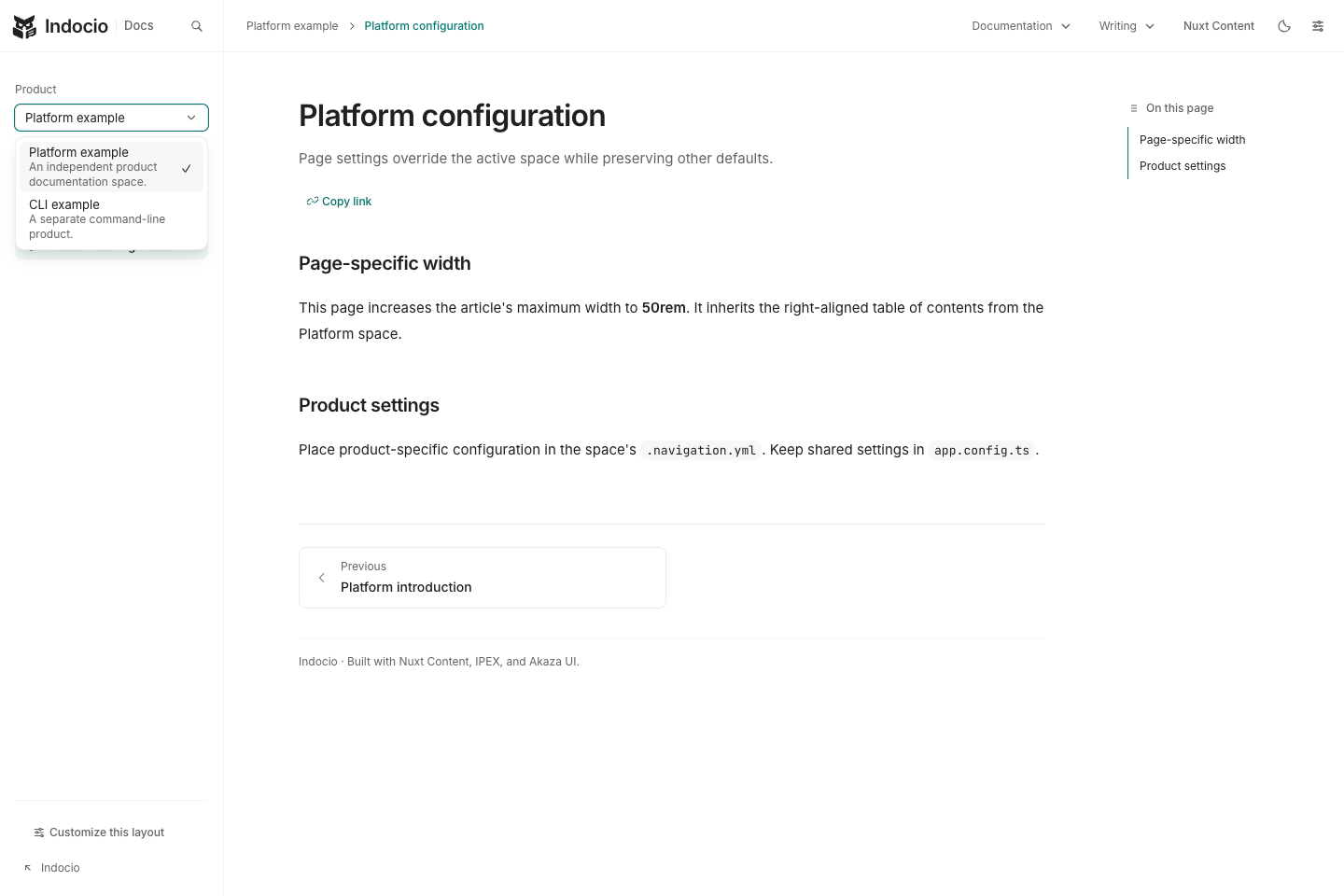
The screenshot shows a site with independent Platform and CLI documentation spaces. This documentation app uses one project, so its product selector and sample product routes are disabled.
The opt-in example content lives in examples/multi-project/content/products/. Copy that folder into a consuming app’s content/products/ directory to try both spaces. The selector appears automatically when the navigation contains at least two spaces. The reusable layer and localized integration fixture retain multi-project support.